Why I Stopped Recommending Drive, Airtable, and Spreadsheets to Accounting Firms
By Dan Gudkov | June 10, 2026 | 5 min read
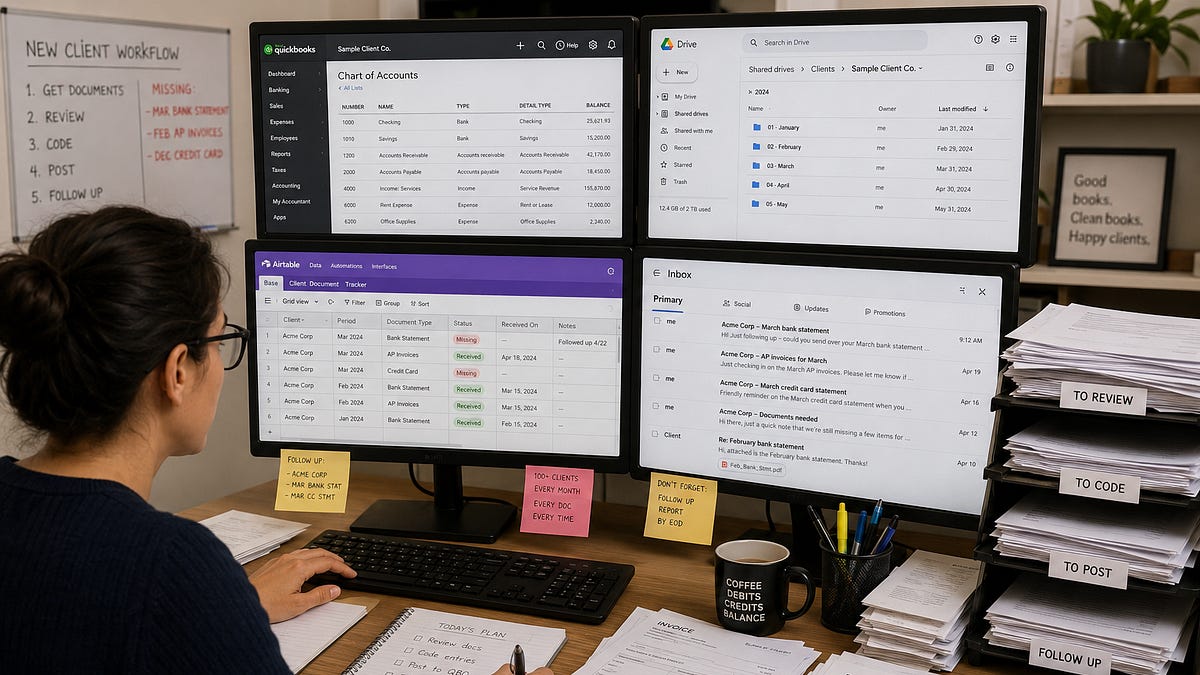
A few months ago I sat in on a call with an average accounting firm — couple of dozens bookkeepers, about 100+ clients between them. I asked one of them to walk me through what happens when a new client signs up. Four tabs were pulled in front of me: QuickBooks Online, for the actual books; a shared Drive folder, where clients dump receipts, invoices, and bank statements; an Airtable base that tracks which documents have come in and which are still missing for each client; and her inbox, which is where most of the actual work happens. Four systems. One client. And every one of those systems has to be touched, by a human, for every document, every month, for every client on the roster. That’s the part that doesn’t scale.
Key Takeaways
- A Drive-and-Airtable setup requires manual coordination for every document, every month, for every client.
- By replacing the separate systems with a single automated workspace, accountants can focus on judgment rather than data-entry plumbing.
- Chase loops can automatically request missing files, validate them, and close the loop without manual follow-up.
- Automating manual handoffs allows accounting firms to scale client capacity without hiring more staff.
The Four-Tabs-Per-Client Problem
QuickBooks Online, for the actual books. A shared Drive folder, where clients dump receipts, invoices, and bank statements — sorted, in theory, by month. An Airtable base that tracks which documents have come in and which are still missing for each client. And her inbox, which is where most of the actual work happens: “Hi, just following up — could you send over your March bank statement when you get a chance?”
Four systems. One client. And every one of those systems has to be touched, by a human, for every document, every month, for every client on the roster.
That’s the part that doesn’t scale. Not the accounting judgment — that’s the easy part for a trained bookkeeper. It’s the handoffs: downloading an attachment, renaming it, dragging it into the right Drive folder, updating the Airtable row, opening QBO, finding the right account, keying in the numbers, and then — if the document never showed up — remembering to follow up. Again. Next week. Multiply that by 100+ clients, and you start to understand why most firms can’t take on client #41 without hiring someone.
What if all of that lived in one place — and most of it ran itself?
This is the question we built dodocs.ai (the engine behind accOS) to answer. Not “how do we make data entry faster,” but “why does data entry need to be a separate step at all?” Here’s what the workflow looks like when there’s one system instead of four:
A client (or, just as often, one of their vendors or suppliers) sends over a document — a bank statement, an invoice, a receipt. It can come in however is easiest for them: uploaded through a simple client portal, forwarded by email, sent over WhatsApp.
dodocs reads it. Not just OCR — it extracts the vendor, the date, the amount, the line items, the document type.
Then it validates it. Is this actually the client it claims to be for? Does the date fall in the period we’re working on? Is this a duplicate of something we already have? Does it match the document type we were expecting? This is the step that’s usually skipped entirely in a Drive-and-Airtable workflow, and it’s where a surprising number of errors hide.
Then it codes it — against that specific client’s real chart of accounts, pulled directly from their QuickBooks. Because dodocs connects to QBO at the client level (not just once for the whole firm), every client’s coding suggestions reflect how their books are actually structured.
Finally, it posts the entry. If the system’s confidence is high, it goes straight into QBO. If anything is ambiguous, it’s queued as an exception for a bookkeeper to glance at and approve. No Drive folder. No Airtable tracker. No “let me just go grab that from my inbox.” One workspace, one source of truth, from the moment a document arrives to the moment it’s a posted journal entry.
The headcount math
Here’s the part I think matters most for firm owners. If you ask most bookkeepers what they spend their time on, “applying accounting judgment” is a small slice of it. The bulk is mechanical: finding documents, naming them, filing them, re-keying numbers, and chasing down what’s missing. None of that requires a CPA. All of it requires a person, every month, per client.
When that mechanical layer disappears — or shrinks down to “review three exceptions and click approve” — the math changes. A bookkeeper who used to be able to manage 15 clients because of how much manual shuffling each one required can now realistically oversee far more, because their job has shifted from doing the data entry to supervising it.
That’s the actual unlock: not “AI does accounting” (it doesn’t, and shouldn’t, replace the judgment), but “AI absorbs the handoffs,” which means a firm can grow its client base without growing its headcount at the same rate. Same team, more capacity, better margins.
The other half of the problem: actually getting the documents
Automating the entry side only helps if the documents show up in the first place. And getting documents out of clients — and sometimes out of their vendors and suppliers — is its own ongoing job. Every accountant knows the rhythm: email a reminder, wait a week, email again, wait, escalate, repeat. Forever. This is where chase loops come in.
Instead of manually reminding each client every month, a bookkeeper sets up a chase loop once — for example: “On the 1st, request bank statements and AP invoices from every client. Remind every 3 days if nothing’s received. After two reminders, flag for me.”
From that point on, the loop runs on the bookkeeper’s behalf. It reaches out across whatever channel works — email, WhatsApp, the client portal — and it isn’t limited to clients. The same loop can request a missing invoice copy directly from a client’s vendor or supplier, the way a bookkeeper might today, except it actually happens reliably and on schedule.
And here’s the part that ties it back to the data entry pipeline: when something comes back — through any channel — dodocs doesn’t just file it and wait for a human to deal with it. It validates it immediately. Right client? Right period? Right document type? Not a duplicate of something already received?
If it checks out, it flows straight into the entry — the loop closes itself, quietly, in the background. If it doesn’t — wrong month, wrong vendor, the wrong file entirely — the loop doesn’t just sit there with a bad document. It automatically goes back to whoever sent it and asks for the right one, with the same patience a good bookkeeper would have, except it never gets tired and never forgets.
What this adds up to
We didn’t set out to build “another tool to add to the stack.” The whole point is that it replaces the stack — the Drive folder, the Airtable tracker, the recurring follow-up emails, and a meaningful chunk of the manual entry — with one system that captures, validates, codes, and posts, and that chases down what’s missing without being asked twice.
For firm owners, that means the constraint on growth stops being “how many people can we hire” and starts being “how many clients do we want.” For clients, it means fewer “did you get my email” follow-ups and a much clearer picture of what’s needed and when.
We’re working with a small group of early firms to test this end-to-end right now. If the four-tabs-per-client problem sounds familiar, I’d love to talk — reply here or reach out directly. Get in touch here: https://dodocs.ai/contact
More articles
From Chasing Clients to Supervising Systems: Managing Modern Accounting Teams
By DoDocs Editorial Team | October 19, 2026 | 3 min read
Cutting the Fat: How Startups Save $15,000+ Annually on Bookkeeping with DoDocs AI
By DoDocs Editorial Team | October 19, 2026 | 3 min read
The Annual ROI of Automation: Reclaiming 120 Hours of Founder Time
By DoDocs Editorial Team | October 19, 2026 | 3 min read